|
|
|
|
 BCD STRING COPY EXAMPE
 |
|
MSC-GW-gw_SCCP $MSC$_GetPoolHandle pool_set
fh_map c" PROT
|
|
|
|
|
ISUP,IAM User-To-User Information |
|
User-To-User Information의 ,Field 0x4B (FreeZoneIndicator) 를 지원하는 유저파트는 회원전용자료실을 참조하세요
|
|
|
|
|
Shell Example (1) |
|
while [ "$input_value" != 0 ]
do
echo ' 1 DataFlowWindow'
echo ' 2 EMUL_SCENARIO'
echo ' 3 TTCN EDITOR'
echo ' 0 Exit'
echo 'Select the number which you want (1~5) ---> '
read input_value
case $input_value in
1) echo "OPEN DataFlowWindow"
cd ..
./tekmain.exe
;;
2) echo "2 pressed !!!"
;;
3) echo "3 pressed !!!"
;;
0) exit
;;
*) echo "$input_value is wrong value"
;;
esac
done
|
|
|
|
|
XP에서 사용자계정 팝업창을 띄울 때 |
|
Command Line에서 아래 명령어를 실행시킵니다.
control userpasswords2
|
|
|
|
|
UDP, TCP에서 Check Sum 계산하는 방법 |
|
|
|
|
|
|
[G20]<Emulation Stack Editor Drag & Drop Toolbar>가 보이지 않을 때 |
|
첨부파일 :
 ToolBar01.doc
Emulation Stack Editor Drag & Drop Toolbar" 가 보이지 않을 때 조치 요령입니다.
2006.06
|
|
|
|
|
K1297-G20 V4.10 |
|
첨부파일 :
SPEC-3G-410.pdf
K1297-G20 V4.10이 지원하는 프로토콜 버전입니다. (WCDMA관련 프로토콜만 정리되어 있읍니다.)
|
|
|
|
|
[G20]Tip for getting a raw data of the message in using MSC <05.02> |
|
<MSC-Project Setup>
variable fh_rrc_dcch_ul ( folder_handle )
100 message $message ( temporary_buffer, 100-byte-array )
: pGetMessage
dup >r
swap fh_rrc_dcch_ul entry_find
r> message_get
;
<ForthBox of MSC>
MSC-GW-IUB_RLCMAC $MSC$_GetPoolHandle pool_set
fh_rrc_dcch_ul " PROT<RRC_DCCH_UL> send to EMUL<umtsrlcmac>" folder_find
" securityModeComplete_MESSAGE_MAIN_SEC_MOD_CNTRL_01_04" $message pGetMessage
|
|
|
|
|
K1404 Manual |
|
|
|
|
|
|
K1403 V3.0.0용 매뉴얼 |
|
링크파일 : http://myhome.hanafos.com/~kyosoon/K1403_M.HTM
링크 <http://myhome.hanafos.com/~kyosoon/K1403_M.HTM>에서
아래와 같은 파일을 다운로드 할 수 있읍니다.
1. basisev3.pdf
2. con_3_en.pdf
3. funktev3.pdf
4. impleev3.pdf
이 매뉴얼은 V3.0.3 기준으로 되어 있으며,
서버 사정에 따라서 지워질 수 있읍니다.
|
|
|
|
|
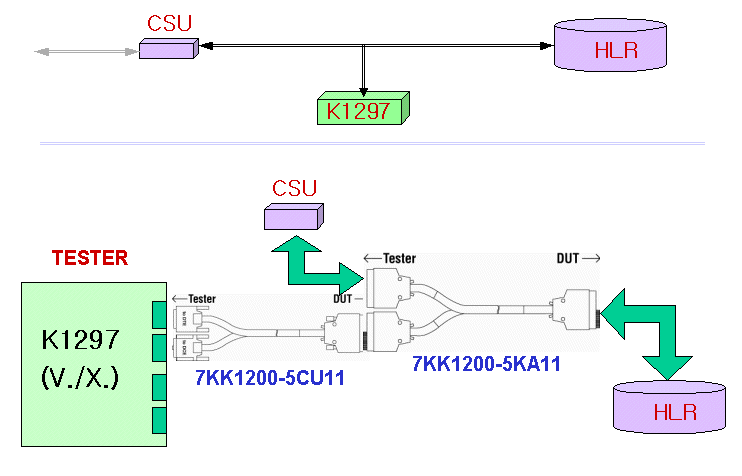
V.35 모니터링 구성을 어떻게 하는지요 ? |
|
|
|
|
|
|
[G20] USB Driver |
|
|
|
|
|
|
[G20] USB Driver for K1297-G20 |
|
|
|
|
|
|
[G20] Remote Support 관련 |
|
첨부파일 :
AppNote-WebEx사용설명서.doc
http://tektronix.webex.com 에 접속한 후,
첨부 파일의 내용대로 미팅 세션을 열어 놓고
Desktop Sharing Control을 K.Lee로 넘겨주면
원격 제어가 가능해집니다.
|
|
|
|
|
[05,V5] K1205 V5.2 모니터링 사용 설명서 |
|
|
|
|
|
|
[G20] Procedure Code Column Setup |
|
첨부파일 :
add_col.exe
G20(V1.11)의 Short View Pane에서 Procedure Code를 볼 수 없으면
첨부 파일을 수행시키면 C:/K1297에 파일 2개가 복사됩니다.
그리고 K1297-G20 소프트웨어를 다시 시작시키면,
Column Setup 메뉴에서 Procedure Code를 추가시킬 수 있읍니다.
|
|
|
|



 V35_Monitoring.gif